▶ tubetui
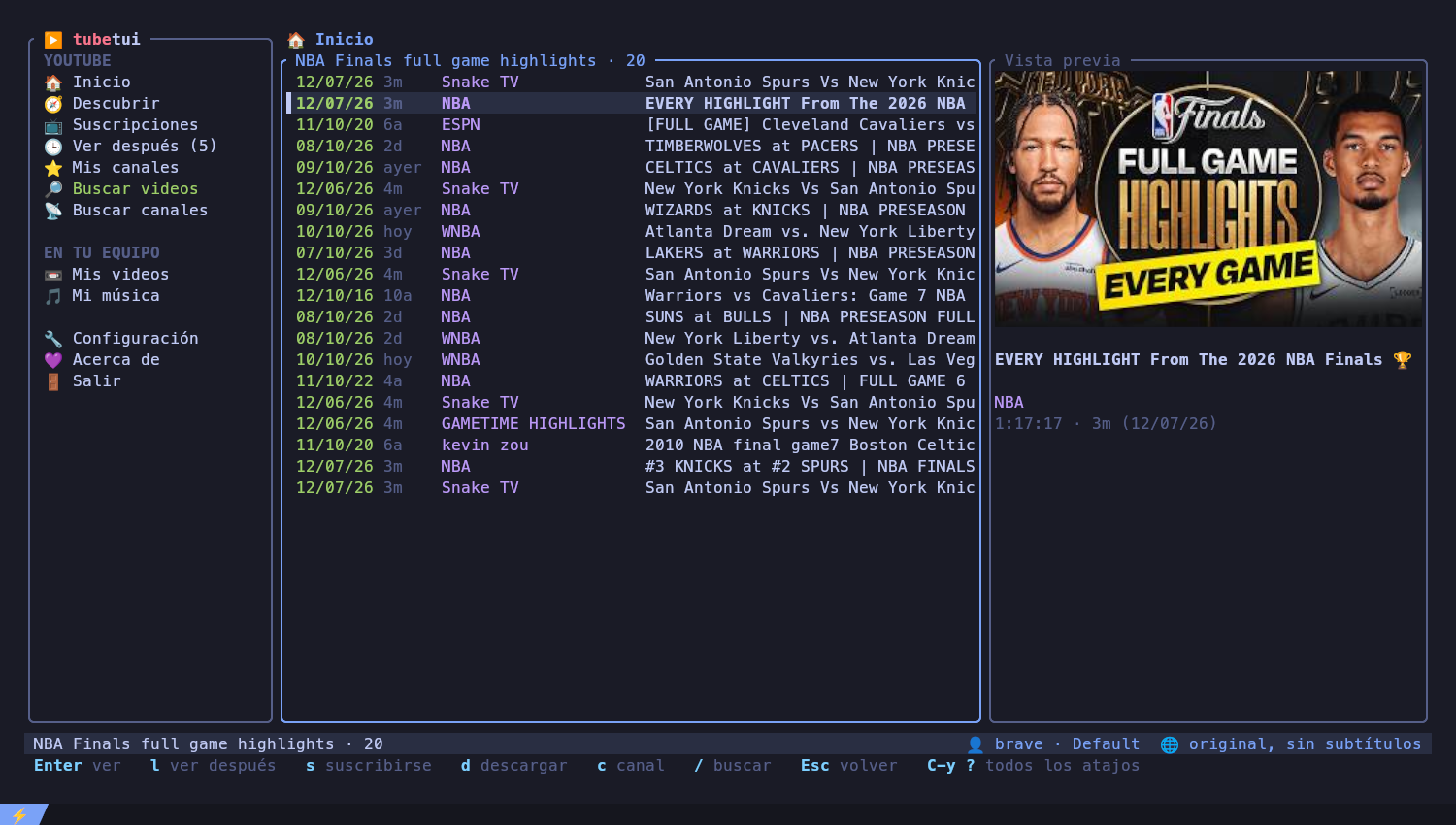
YouTube, tus suscripciones y tus videos y música locales, en la terminal. Pestañas, Ver después, búsqueda instantánea y video integrado en kitty. YouTube, your subscriptions and your local videos and music, in the terminal. Tabs, watch later, instant search and video embedded in kitty.
Gratis y de código abierto · MIT / Apache-2.0 · Linux, Windows y macOS Free and open source · MIT / Apache-2.0 · Linux, Windows and macOS
# DescargasDownload
Siempre la última versión. Todas necesitan mpv y yt-dlp (el instalador de Windows los instala por vos). Always the latest version. All of them need mpv and yt-dlp (the Windows installer installs them for you).
🪟 Windows tu sistemayour system
Windows 10 y 11, 64 bits. Se usa desde Windows Terminal.Windows 10 and 11, 64-bit. Use it from Windows Terminal.
tubetui-setup.exeinstaladorinstaller tubetui.zipportableportable🐧 Linux tu sistemayour system
x86_64. Con kitty el video se ve dentro de la app.x86_64. In kitty the video plays inside the app.
tubetui_amd64.debDebian · Ubuntu · Mint tubetui-linux.tar.gzcualquier distroany distro🍎 macOS tu sistemayour system
Apple Silicon (M1 en adelante).Apple Silicon (M1 and later).
tubetui-macos.tar.gzarm64 cargo install tubetuiIntel y el restoIntel and the restTodas las versiones y sus notas: Every version and its notes: GitHub Releases · crates.io
# FuncionesFeatures
Todo YouTube desde el teclado (o el mouse), sin abrir el navegador.All of YouTube from the keyboard (or the mouse), without opening the browser.
Inicio y suscripcionesHome and subscriptions
Tu feed, lo nuevo de tus canales, Descubrir (sin los canales que ya seguís) y Mis canales con su descripción.Your feed, what's new on your channels, Discover (without the ones you follow) and My channels with their description.
Búsqueda en un segundoSearch in a second
20 resultados y 20 más al bajar, con vista previa y portada. En todo YouTube, en tus canales o dentro de uno.20 results and 20 more as you scroll, with a preview and thumbnail. All of YouTube, your channels or inside one.
Video a tu maneraVideo your way
Integrado en kitty, en una ventana de mpv o superpuesto sobre la app (X11, con la placa de video). Calidad y compresión cambian al vuelo.Embedded in kitty, in an mpv window or laid over the app (X11, GPU decoding). Quality and codec change on the fly.
PestañasTabs
Un video por pestaña, el audio sigue mientras buscás otra cosa. En ventana aparte, la pestaña muestra la ficha y "A continuación".One video per tab, audio keeps playing while you browse. With a separate window, the tab shows the details and "Up next".
Ver después y descargasWatch later and downloads
Guardá videos con l, suscribite con s, descargá con subtítulos con d.Save videos with l, subscribe with s, download with subtitles with d.
Subtítulos y doblajeSubtitles and dubbing
Original, subtítulos o audio doblado, en el idioma que elijas, sin cortar el video.Original, subtitles or dubbed audio, in the language you choose, without stopping the video.
Tu sesión, sin contraseñasYour login, no passwords
Toma la sesión de tu navegador (Brave, Chrome, Firefox, Edge… también snap y flatpak) o de un cookies.txt.Uses your browser's login (Brave, Chrome, Firefox, Edge… snap and flatpak too) or a cookies.txt.
Tus archivosYour files
Tus videos y tu música locales, con cola de reproducción. Marcá varios y mandalos a la papelera.Your local videos and music, with a play queue. Mark several and send them to the trash.
Liviana y lindaLight and pretty
25 MB de memoria, arranca al instante. Animaciones, íconos y mouse, todo configurable. Español e inglés.25 MB of memory, starts instantly. Animations, icons and mouse, all configurable. Spanish and English.
# InstalarInstall
Elegí tu sistema.Pick your system.
Bajá y ejecutá tubetui-setup.exe: instala para tu usuario (sin administrador), agrega tubetui al menú Inicio y al PATH, y con la casilla marcada instala mpv y yt-dlp. A mano: Download and run tubetui-setup.exe: it installs for your user (no administrator), adds tubetui to the Start menu and the PATH and, with its box ticked, installs mpv and yt-dlp. By hand:
winget install --id shinchiro.mpv -e
winget install --id yt-dlp.yt-dlp -e
tubetui
En Windows el video se abre en una ventana de mpv. Para la sesión de YouTube conviene Firefox: Chrome y Edge cifran sus cookies de una forma que yt-dlp no siempre puede leer.On Windows the video opens in an mpv window. For the YouTube login prefer Firefox: Chrome and Edge encrypt their cookies in a way yt-dlp cannot always read.
# mpv viene como dependencia; yt-dlp mejor actualizado con pipx
wget https://github.com/polblancoo/tubetui/releases/latest/download/tubetui_amd64.deb
sudo apt install ./tubetui_amd64.deb
pipx install yt-dlp
tubetui
curl -L https://github.com/polblancoo/tubetui/releases/latest/download/tubetui-x86_64-linux.tar.gz | tar xz
install -Dm755 tubetui/tubetui ~/.local/bin/tubetui
# y mpv + yt-dlp con tu gestor de paquetes, por ejemplo:
sudo pacman -S mpv yt-dlp # Arch
sudo dnf install mpv yt-dlp # Fedorabrew install mpv yt-dlp
curl -L https://github.com/polblancoo/tubetui/releases/latest/download/tubetui-aarch64-macos.tar.gz | tar xz
install -m755 tubetui/tubetui /usr/local/bin/tubetui
# la primera vez, si macOS lo bloquea:
xattr -d com.apple.quarantine /usr/local/bin/tubetui# cualquier sistema con Rust (rustup.rs)
cargo install tubetuiPara ver el video dentro de la app usá kitty. En cualquier otra terminal se abre en una ventana.To watch the video inside the app use kitty. In any other terminal it opens in a window.
# AtajosKeys
La línea de abajo de la app siempre muestra las teclas que sirven en ese momento; Ctrl+y ? las muestra todas.The app's bottom line always shows the keys that work right now; Ctrl+y ? shows them all.
ListasLists
| ↑↓ jk | moversemove |
| Enter | ver · abrir canalplay · open channel |
| / | buscarsearch |
| l s d c | Ver después · suscribirse · descargar · canalwatch later · subscribe · download · channel |
| espacio x | tus archivos: marcar · a la papelerayour files: mark · to the trash |
| Esc | volverback |
Mirando un videoWatching
| espacio | pausapause |
| ←→ ↑↓ | ±5 s · volumen±5 s · volume |
| v b | calidad · compresiónquality · codec |
| j i o | subtítulos · original/doblado · idiomasubtitles · original/dubbed · language |
| f Tab | pantalla completa · A continuaciónfullscreen · Up next |
Siempre: Ctrl+y y una teclaAnywhere: Ctrl+y, then a key
| n p 0-9 | pestañastabs |
| x | cerrar la pestañaclose the tab |
| b m | mostrar el menú · ir al menúshow the menu · go to it |
| l | español ⇄ English |
| ? q | ayuda · salirhelp · quit |
# DocumentaciónDocumentation
Todo lo que la app puede hacer y cómo configurarla.Everything the app does and how to set it up.
# Apoyar el proyectoSupport the project
tubetui es gratis. Si te sirve, una estrella en GitHub ayuda; y si querés, una donación:tubetui is free. If you find it useful, a star on GitHub helps; and if you like, a donation:
G5PVFgymo47BE3SoxzB9RvTp2ZR8z6tkXLL8hPFJu1Gm0xf0666bcA8F1b1f910E47D0f8e61185EB0E343a220xf0666bcA8F1b1f910E47D0f8e61185EB0E343a22